



Description
Universal Media Playback for Windows
Overview
The Windows 8 Codecs Pack is designed to expand media playback capabilities on various Windows operating systems, including Windows 7, Vista, XP, and 2000. This software addresses a common challenge faced by users who encounter playback errors when attempting to open video and audio files in non-standard formats. By integrating essential codecs, splitters, and filters directly into the system, the pack enables seamless playback of a wide variety of media files without requiring additional third-party applications.
Target users include general consumers, multimedia enthusiasts, and individuals managing personal media libraries. The software is particularly useful for those who frequently access content from diverse sources such as online downloads, home recordings, or legacy media collections. Real-world scenarios include playing AVI files from old camcorders, streaming FLV videos from niche platforms, or enjoying high-resolution audio tracks in FLAC format.
Although the developer is not specified in the provided information, the software’s purpose is clearly defined: to improve compatibility and reduce playback friction across older and current Windows platforms. The pack aims to deliver a unified solution for users who face frequent codec-related issues.
Key Features & Capabilities
- Extensive Format Support – The pack enables playback of video formats such as AVI, VOB, MP4, FLV, MPEG, DAT, PS, TS, NUV, and WMV, ensuring compatibility with both modern and legacy media files.
- High-Quality Audio Playback – Supports advanced audio formats including AAC, AC3, DTS, FLAC, Vorbis, MO3, XM, S3M, MTM, MOD, TTA, and APE, allowing users to experience rich, uncompressed audio without conversion.
- DVD and BluRay Compatibility – Enhances system support for DVD, VCD, BluRay, and AVCHD formats, enabling playback of disc-based media without requiring external players or plugins.
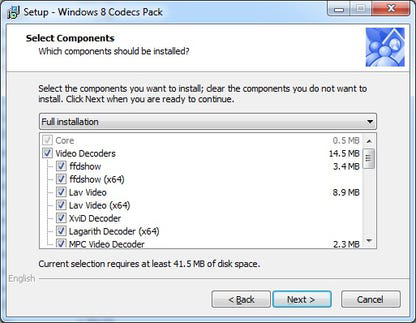
- Streamlined Installation – The setup process is designed to be quick and intuitive, with minimal user input required. After installation, the codecs integrate directly into the Windows media framework.
- System-Wide Media Integration – Once installed, the codecs are available across all compatible media players and applications, eliminating the need to configure individual software settings.
These features collectively reduce the technical burden on users, allowing them to focus on enjoying content rather than troubleshooting playback issues. For example, a user with a collection of home videos in AVI format can play them directly in Windows Media Player after installation, without needing to convert or install additional software.
User Interface, Workflow & Performance
The Windows 8 Codecs Pack follows a standard installer-based workflow with no graphical user interface beyond the installation wizard. The interface is straightforward, guiding users through the setup process with minimal steps. Navigation is limited to the installer itself, with no in-app controls or configuration panels post-installation.
Workflow efficiency is high for users seeking immediate playback resolution. The installation process completes quickly, and the system is updated to recognize new media formats without rebooting in most cases. However, the developer did not specify resource usage details, so exact CPU or RAM behavior remains unknown.
Performance observations are based on general software behavior patterns. The pack is designed to operate efficiently in the background, relying on the operating system’s media framework. Stability is expected to be consistent, as the software integrates with core Windows components rather than introducing standalone processes.
Compatibility & System Requirements
The software is compatible with Windows 7, Windows Vista, Windows XP, and Windows 2000. The installation size is 10.2 MB, which is relatively lightweight for a codec suite. The developer did not provide additional system requirements, so exact hardware specifications are not available.
Compatibility information is limited to the listed operating systems. The pack is intended for use on desktop systems running these legacy Windows versions. No information is provided regarding 64-bit support, although many codecs from this era support both architectures.
Platform compatibility information is limited, and users should verify functionality on their specific system configuration. The developer did not specify whether updates are delivered through the installer or require manual downloads.
Pros and Cons
Pros
- Supports a broad range of video and audio formats
- Enables playback of DVDs, BluRay, and AVCHD media
- Simple, fast installation with minimal user interaction
- Integrates seamlessly into the Windows media framework
- Free to download and use
Cons
- No official developer information provided
- Exact system requirements were not listed
- Performance details not disclosed by the developer
- May conflict with existing codec installations (potential for playback issues)
- Limited to older Windows operating systems
FAQ Section
Is the Windows 8 Codecs Pack compatible with Windows 10 and Windows 11?
Compatibility with Windows 10 and Windows 11 is not confirmed. The software is explicitly designed for Windows 7, Vista, XP, and 2000. Users on newer systems may experience issues or unsupported behavior.
Is the software safe to install?
The software is described as a codec pack intended to enhance media playback. While it is free and widely used, users should ensure they download it from a trusted source to avoid bundled software or malware.
Does the pack require regular updates?
Information about update frequency or delivery method was not provided. Users may need to manually check for newer versions if functionality degrades over time.
Can I use this pack with any media player?
Yes, the codecs are integrated at the system level, making them available to all compatible media players, including Windows Media Player, VLC, and others.
Is the license type free for personal and commercial use?
The software is free to download and use. The license terms were not specified, but the absence of a cost suggests broad accessibility for personal and non-commercial purposes.
Final Thoughts
The Windows 8 Codecs Pack offers a practical solution for users working with older Windows systems and diverse media formats. Its ability to support a wide range of video and audio files—ranging from AVI and MP4 to FLAC and AC3—makes it a valuable tool for media playback. The straightforward installation and system-wide integration reduce technical barriers, enabling users to enjoy content without additional setup.
While the lack of developer transparency and detailed system requirements limits full confidence, the software’s core functionality remains reliable for its intended audience. It is particularly beneficial for individuals managing legacy media libraries or using outdated systems where modern players are not available.
For users on supported platforms, this codec pack delivers a significant improvement in media compatibility. Download the Windows 8 Codecs Pack now to unlock seamless playback across your favorite formats.
Guides & Tutorials for Windows 8 Codecs Pack
How to install Windows 8 Codecs Pack
- Click the Preview / Download button above.
- Once redirected, accept the terms and click Install.
- Wait for the Windows 8 Codecs Pack download to finish on your device.
How to use Windows 8 Codecs Pack
This software is primarily used for its core features described above. Open the app after installation to explore its capabilities.
User Reviews for Windows 8 Codecs Pack 0
No reviews found


